

Artificial Intelligence
Building an AI Virtual Mouse with Python and MediaPipe
How I built a touchless virtual mouse that tracks hand gestures with Python, OpenCV and MediaPipe.

Introduction
Computer vision makes it possible for computers to interpret visual information from the world around them. One interesting application is controlling a computer using hand gestures instead of a traditional mouse.
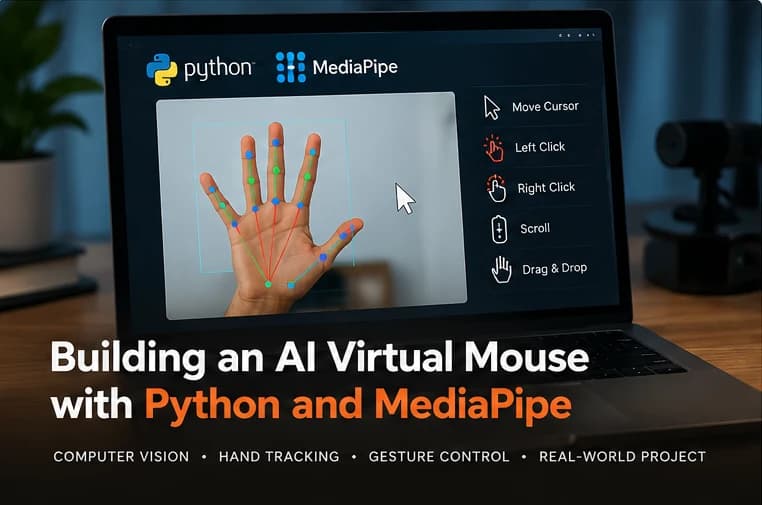
An AI virtual mouse uses a camera to detect hand movements and translate selected gestures into cursor actions. Depending on its implementation, it can support cursor movement, clicking, scrolling, and drag-and-drop interactions.
I explored this concept through an AI Virtual Mouse project built using Python, OpenCV, and MediaPipe. The project combines real-time camera input, hand tracking, and gesture-based interaction to explore an alternative way of controlling a computer.
In this article, we'll examine the technologies behind a virtual mouse, how its components fit together, and the main challenges involved in building one.
What Is an AI Virtual Mouse?
An AI virtual mouse is a computer vision application that uses visual input, typically from a webcam, to control a computer cursor.
Instead of moving a physical mouse, the user performs gestures in front of a camera. Software detects the hand, estimates the positions of important landmarks, and maps selected movements or gestures to mouse actions.
A typical implementation may support:
- Moving the cursor with a finger.
- Performing a click using a selected gesture.
- Scrolling through content.
- Dragging and dropping items.
- Interacting with desktop applications.
The exact functionality depends on how the gesture recognition and cursor-control logic are implemented.
Technologies Used
Python
Python is widely used for computer vision and AI projects because it has a large ecosystem of libraries and an accessible development workflow.
In a virtual mouse application, Python can coordinate camera input, hand tracking, gesture processing, and operating-system mouse actions.
OpenCV
OpenCV is a computer vision library that provides tools for working with images and video.
For a virtual mouse, it can be used to capture webcam frames, process image data, display visual feedback, and support the real-time video pipeline.
MediaPipe
MediaPipe provides tools for building perception applications, including hand landmark detection and tracking.
A hand landmark model can identify key points on the hand, such as fingertips and joints. These points provide useful information for interpreting finger positions and movements.
MediaPipe supplies the hand-tracking capabilities; application code is still needed to turn those landmarks into reliable mouse actions.
How an AI Virtual Mouse Works
A typical virtual mouse can be divided into several stages.
Step 1: Capture Webcam Frames
The application obtains a stream of frames from a webcam.
Each frame represents the current visual scene. Processing frames continuously allows the system to respond to hand movements in near real time.
OpenCV can be used to access the camera and retrieve these frames.
Step 2: Detect the Hand
The frames are passed to a hand-tracking system.
When a hand is detected, the system estimates landmark positions. These landmarks provide a structured representation of the hand rather than requiring the application to interpret every pixel independently.
Detection quality may vary with lighting, camera quality, background clutter, hand orientation, and how much of the hand is visible.
Step 3: Interpret Hand Landmarks
The application identifies the landmarks relevant to the interaction.
For example, the position of an index fingertip can serve as a reference point for cursor movement. Other landmarks may help determine whether a finger is extended or whether two fingers are close together.
Gesture interpretation is a separate step from landmark detection. The application must define which positions and movements correspond to specific actions.
Step 4: Map Hand Movement to Screen Coordinates
Camera coordinates and screen coordinates are different.
A fingertip's position in the camera frame needs to be mapped to the area of the screen where the cursor should move.
A simplified linear mapping can be expressed as:
screen_x = map_x(hand_x, camera_width, screen_width)
screen_y = map_y(hand_y, camera_height, screen_height)
Here, map_x and map_y represent coordinate-mapping functions. They are illustrative placeholders rather than built-in Python functions.
In a real implementation, the developer must account for coordinate ranges, screen boundaries, camera orientation, and the usable movement region.
A mapping that is too sensitive can make the cursor difficult to control. A mapping that is too restrictive may prevent users from reaching parts of the screen comfortably.
Step 5: Recognize Gestures
The system interprets landmark positions or movements to identify a command.
For example, an application might define a gesture for clicking or scrolling. The precise gestures depend on the implementation.
Gesture recognition needs to be stable. If the system mistakes a normal hand movement for a click, the cursor may activate controls unexpectedly.
Practical techniques include:
- Requiring a gesture to remain valid briefly before triggering it.
- Using thresholds with suitable margins.
- Tracking changes between consecutive frames.
- Applying smoothing to reduce noisy landmark movement.
- Introducing a short cooldown for actions that should not repeat continuously.
These techniques help make interaction more predictable.
Step 6: Perform the Mouse Action
Once a gesture is recognized, the application sends the corresponding mouse command through an appropriate input-control library or operating-system interface.
Depending on the design, commands can include moving the pointer, clicking, scrolling, or holding a button for dragging.
The implementation should avoid triggering actions repeatedly while a gesture remains active unless repetition is intentional.
Designing Cursor Movement
Cursor movement is one of the most important parts of a virtual mouse because small variations in hand position can make the pointer feel unstable.
Use a Comfortable Control Region
The entire camera frame does not necessarily need to map to the entire display. A smaller, clearly defined control region can make cursor movement easier to manage.
Apply Smoothing
Landmark positions can fluctuate slightly between frames. Mapping every small change directly to the cursor may create jitter.
A simple exponential smoothing approach is:
smoothed_x = alpha * target_x + (1 - alpha) * previous_x
smoothed_y = alpha * target_y + (1 - alpha) * previous_y
Here, target_x and target_y are the newly mapped coordinates, while previous_x and previous_y are the previous smoothed positions. alpha is a value between zero and one.
A lower alpha generally produces smoother but slower movement. A higher alpha responds more quickly but may preserve more jitter.
The appropriate balance depends on the camera, gesture design, and intended use.
Challenges in Building an AI Virtual Mouse
A virtual mouse may look simple in a demonstration, but making it reliable introduces several engineering challenges.
1. Cursor Jitter
Small variations in detected landmarks can make the pointer shake. Smoothing helps, but excessive smoothing introduces lag.
2. Accidental Clicks
A gesture may be detected when the user did not intend to click. Gesture thresholds, state transitions, and cooldowns can reduce accidental activation.
3. Lighting and Background Conditions
Poor lighting, occlusion, and complex backgrounds can make hand tracking less reliable. Testing in different environments helps reveal these limitations.
4. Coordinate Mapping
Camera coordinates do not directly correspond to screen positions. Poor mapping can make movement feel unnatural or cause the cursor to reach screen edges unexpectedly.
5. Responsiveness
The application needs to process frames and respond to gestures quickly enough to feel interactive. Camera capture, image processing, hand tracking, and cursor-control logic all contribute to the total delay.
Profiling each stage can help identify the main source of latency.
Potential Improvements
A virtual mouse can be extended in several ways.
Possible improvements include:
- Adding configurable gesture sensitivity.
- Supporting different screen sizes and multiple monitors.
- Providing a visual indicator when a gesture is recognized.
- Adding a pause gesture to prevent accidental input.
- Improving cursor smoothing and click stability.
- Offering user-configurable gestures.
- Measuring recognition accuracy and interaction latency under different conditions.
For applications intended to support accessibility needs, usability testing with the intended users is especially important. A camera-based interface should not be assumed to work for everyone simply because it works in a demonstration.
What I Learned from the Project
Building an AI Virtual Mouse is an opportunity to explore how computer vision connects with practical software interaction.
The project brings together several important concepts: processing real-time video, identifying hand landmarks, interpreting gestures, mapping coordinates, and triggering computer actions.
It also illustrates that detecting a hand is only one part of the problem. A useful interaction system must translate that detection into movements and actions that feel predictable and responsive.
The project can serve as a foundation for further experiments in human-computer interaction, gesture recognition, and accessible interface design.
Conclusion
An AI Virtual Mouse demonstrates how Python, OpenCV, and MediaPipe can be combined to explore gesture-based computer control.
The core workflow involves capturing camera frames, tracking hand landmarks, interpreting gestures, mapping coordinates, and executing mouse actions.
Although the concept is straightforward, reliability depends on careful handling of jitter, gesture recognition, lighting conditions, and responsiveness.
For developers interested in computer vision, the project offers a practical way to connect visual perception with a real interactive application. It also provides opportunities to explore more advanced gesture interfaces and alternative approaches to human-computer interaction.